en


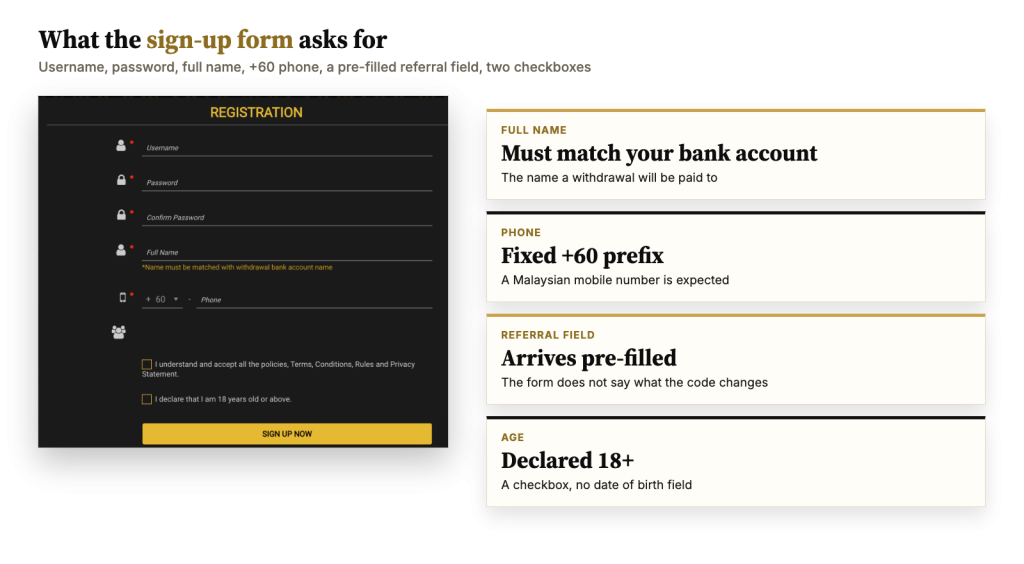
The JDL688 sign-up form asks for a username, a password and its confirmation, your full name, a phone number fixed to the +60 prefix, a referral field that arrives already filled in, and two ticked checkboxes before the SIGN UP NOW button is used. One note sits under the name field: the name must be matched with the withdrawal bank account name.
JDL688 login is separate and shorter. A LOGIN button sits at the top right of every page and takes a username and password. Identity verification is a third step, inside the member area, and it asks for more than registration did.
The visible form is one screen, and each field carries a consequence later.
| Field | What it asks for |
|---|---|
| Username | The name you will log in with. No format rule is shown next to it. |
| Password and Confirm Password | The same password twice. The form publishes no character or length rule. |
| Full Name | Your name, with a note that it must match the withdrawal bank account name. |
| Phone | A number with the +60 prefix, which is fixed and not selectable. |
| Referral | A code that is already filled in when the form loads. |
| Checkboxes | One accepting all policies, Terms, Conditions, Rules and the Privacy Statement; one declaring you are 18 or above. |
The +60 prefix means the form expects a Malaysian mobile number, which matches the rest of the site: balances are in MYR and the listed banks are Malaysian.
The note under Full Name is the only withdrawal rule shown anywhere in the account area. In practice it means the payout record and the bank record have to agree, so an initial, a shortened form or a name entered in a different order can put them out of line. The registered name is the one that has to appear on the receiving account.
Because deposits are also tied to your own bank details, it is useful to see how deposits are reported before the first transfer, since the Local Bank method asks you to submit a receipt, a reference number and the time of the transfer yourself.
Before you continue
The referral field is already filled in when the form opens, and the form gives no explanation of what the code does.
The code is present before you type anything. As a rule in this industry, a referral or agent code ties a new account to whoever referred it, and it can also decide which promotions or agent structure the account sits under. None of that is stated on the form, and the form does not say whether the field can be cleared or replaced.
Live chat is the contact route listed on every page. If the code matters to you, ask there before submitting.
The JDL688 sign up has no email field, no date of birth field and no captcha. Age is handled by the declaration checkbox rather than a date entry, and the only identifier you supply that reaches you outside the site is the phone number.
Login is a username and password through the LOGIN button in the header.
After logging in, the sidebar lists Wallet Balance as a Main Wallet plus a separate balance line for each product, 25 product wallets in total, including Playtech, Evolution Gaming, SA Gaming, MEGA888, Pussy888, JILI, 918Kiss, SABA and Grand Dragon Lotto. The member menu carries Deposit, Withdrawal, Transfer, Bank Account, Transaction History and Bet Record. One line, JILI, reads Maintenance instead of an amount. If you want the full layout of the lobby and its sections before creating an account, the casino overview covers what the site holds.
No password reset or forgotten-password flow appears in the login area. Inside the account there is a Change Password tab, which requires you to be logged in already; outside it, live chat is the listed route.
The Downloads page lists one client per provider, mostly as Android files. Each entry shows Kindly login to continue, so a login is required at the client as well as on the site, and whether those credentials are the same as your JDL688 login is not shown. No single JDL688 app in an app store is listed.
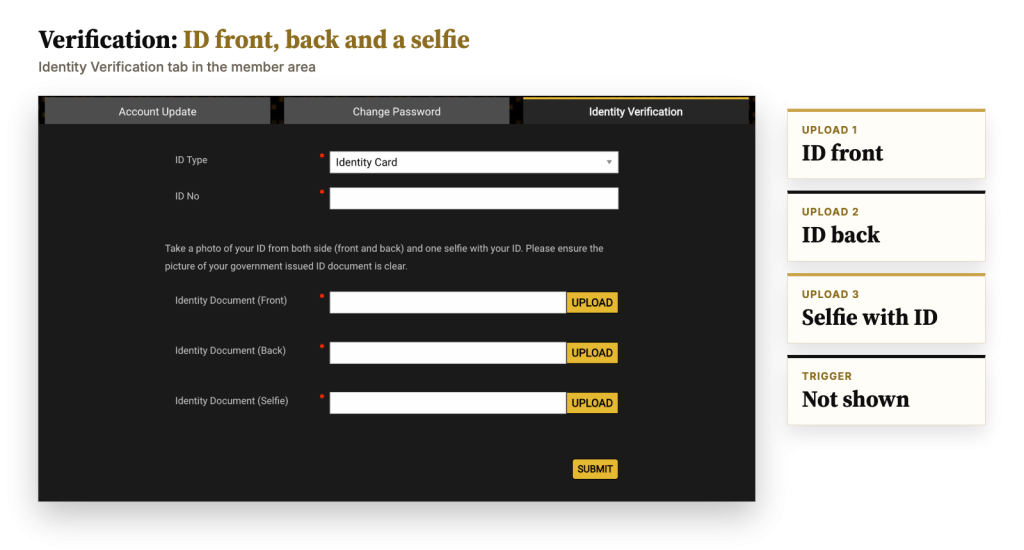
Inside the account, the settings area has three tabs: Account Update, Change Password and Identity Verification. The verification tab asks for an ID Type, with Identity Card shown in the dropdown, and an ID number. Then it asks for three files:
The instruction states the government ID must be clear. When verification is required, at sign-up, before the first withdrawal, or only when the operator asks, is not shown anywhere in the account.
In general, operators run this check before releasing a first withdrawal, and an incomplete or unreadable upload is what holds that payout in place. Because the trigger is not published here, the practical step is to have both sides of the ID and the selfie ready, and to make sure the name on that ID is the name you entered at registration and the name on your bank account.
Stated
Four easy steps to win, register, deposit, play and win.
In practice
Registration alone involves a name that has to match a bank account, a referral code you did not enter, an age declaration and acceptance of terms, followed later by an ID upload from both sides plus a selfie. The deposit step is a separate reported transfer rather than a single click.
Check the referral field and confirm the name on your withdrawal bank account before you submit the form.