en


The JDL688 deposit section sits inside the member area and lists four funding tabs, each with a MYR 30 minimum. Before any of those limits matter, two notices on the homepage deal with the accounts that receive the money.
Both notices point the same way in practice. The receiving details change, a transfer sent to an outdated account or QR code is treated as the player’s own loss, and live chat is where the current account is confirmed.
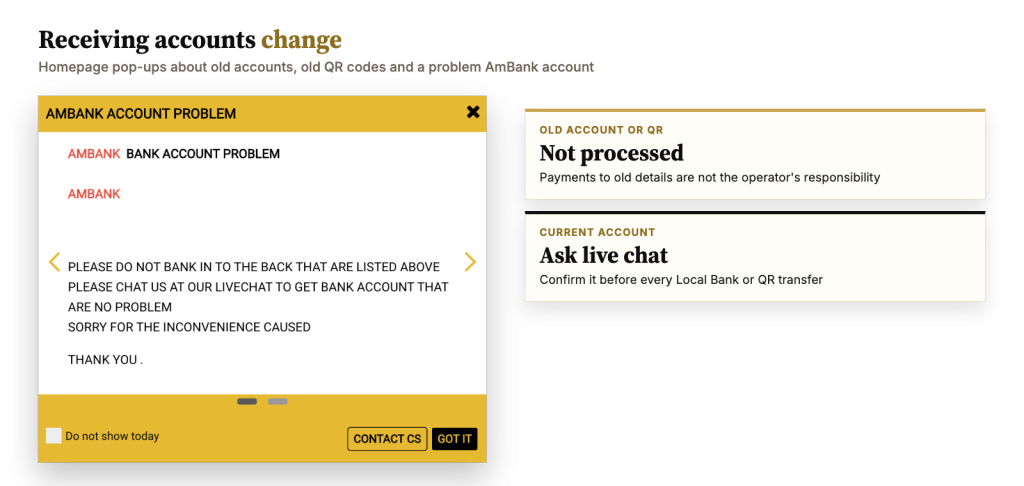
The first pop-up, headed Payment Notice, states that payments by online transfer made using the old bank account or the old QR code will not be processed, and that the operator will not be responsible for any payment made to the old bank account or QR code. It asks players to use the updated payment details.
The second pop-up is headed AMBANK ACCOUNT PROBLEM. It names an account holder, asks players not to bank in to the accounts listed on it, and tells them to chat with live chat to get a bank account that has no problem, with an apology for the inconvenience. Both pop-ups carry the buttons Do not show today, CONTACT CS and GOT IT.
Why the accounts change is not stated anywhere on the site.
For a player, the consequence is a fixed routine rather than a one-off check. Confirm the current receiving account in live chat immediately before each Local Bank or QR transfer, and do not reuse details from a previous deposit, a saved payee in your banking app, or an older chat message. Because the notices place responsibility for a misdirected payment on the sender, a transfer to a retired account has no published route back.
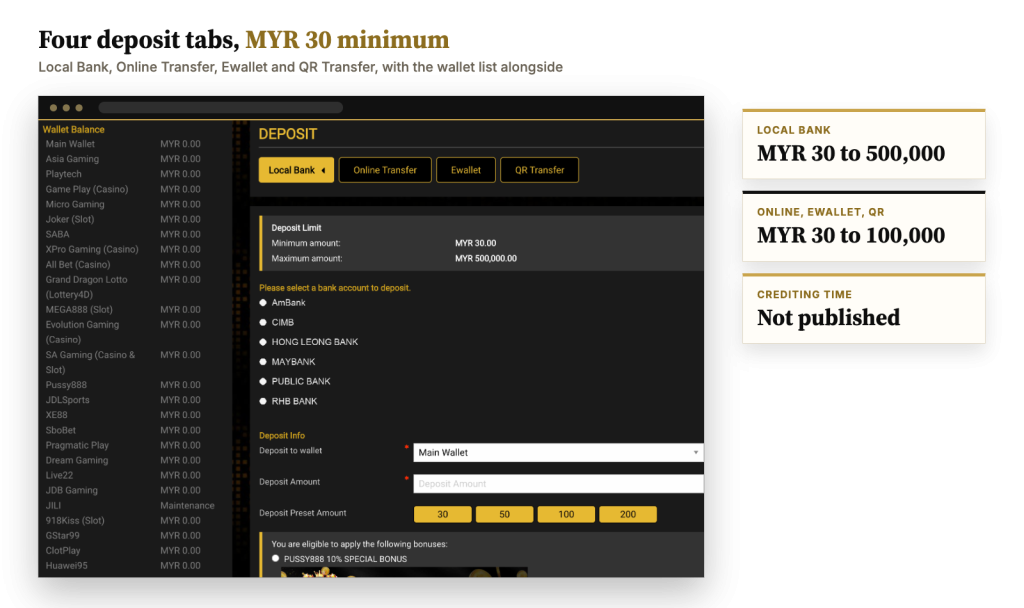
The deposit form opens on four tabs: Local Bank, Online Transfer, Ewallet and QR Transfer. All four share the same MYR 30 minimum, and the maximum is the only limit that differs between them. Above the amount field sit preset buttons for 30, 50, 100 and 200, and a Deposit to wallet dropdown that defaults to Main Wallet.
| Method | Limits and what is shown |
|---|---|
| Local Bank | MYR 30 to MYR 500,000. Six bank accounts listed with masked digits: AmBank, CIMB, Hong Leong Bank, Maybank, Public Bank, RHB Bank. Receipt, reference number and deposit time are required. |
| Online Transfer | MYR 30 to MYR 100,000. Two gateways are named, SpeedPay and DirectPay, with a Deposit Bank dropdown. |
| Ewallet | MYR 30 to MYR 100,000. No e-wallet is named on the tab; the form runs a bonus check only. |
| QR Transfer | MYR 30 to MYR 100,000. A Deposit Bank dropdown is shown. |
| Crediting time | Not published for any of the four methods. |
The Ewallet tab is the thinnest of the four in terms of what it tells you. It shows the limits and nothing about which wallet brands are accepted, so the method has to be confirmed in live chat before it is used.
Online Transfer and QR Transfer both name a bank through a dropdown rather than a bank account you copy by hand. As a rule, a gateway of that kind hands the payment over to a bank login or a scan, which is why those two tabs ask for less information afterwards than Local Bank does.
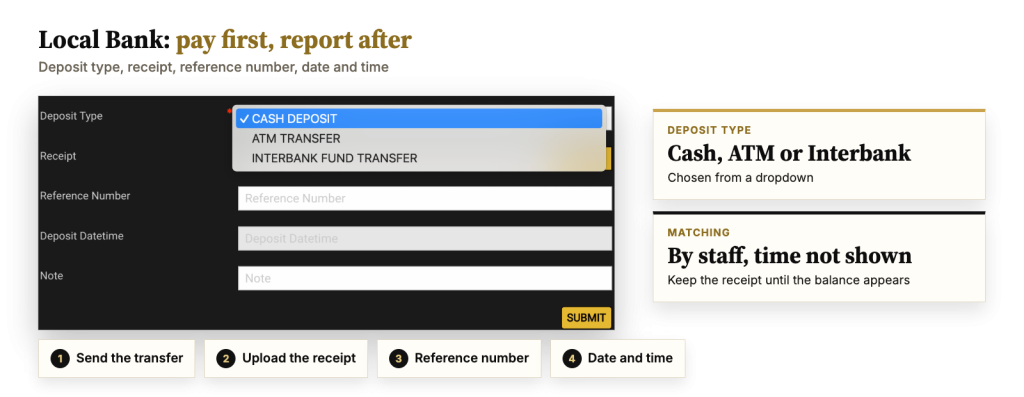
Local Bank is not a payment you make on the site. You send the money yourself from your own bank, ATM or banking app, then report the transfer on the form so that it can be matched. That is why this tab asks for a Deposit Type (Cash Deposit, ATM Transfer or Interbank Fund Transfer), a receipt upload, a reference number and a deposit date and time.
In general, a deposit reported this way is credited only once staff match your report against the incoming bank record. A wrong reference number or a time that does not line up with the transfer delays that match, so keep the receipt until the balance appears.
The bonus list is part of the deposit itself rather than a separate claim step. Each option appears as a radio button with its own banner, and no turnover, cap or expiry is printed beside it on the form, so read the terms behind the promotions offered at deposit before selecting one instead of No, thanks.
Confirm the current receiving bank account in live chat before sending anything, then open the deposit form from the member menu.
Money on the site is not held in one balance. The member sidebar lists a Wallet Balance block containing the Main Wallet, then a separate balance line for each of 25 products, and a TOTAL at the bottom. The member menu alongside it carries Deposit, Withdrawal, Transfer, Bank Account, Transaction History and Bet Record, so a dedicated Transfer function exists. Whether a balance also moves to a provider by itself when a game opens is not shown.
Grouped by where the providers appear in the lobby, the wallet lines are:
The JILI line is the exception in that list: instead of an amount it reads Maintenance. JILI is at the same time the first provider tab in the slot lobby, and every slot tile visible there carries a JILI badge. Whether those games launch while the wallet shows that status is not shown.
With per-provider wallets, funds behave the way they do on any split-wallet platform. Money sitting in one provider’s wallet is not available in another provider’s game until it is moved back, so check which line holds your balance before you start playing, and again before requesting a payout. How the lobby behind these wallets is laid out is covered in the lobby overview.
Not shown
The withdrawal form and its limits. No minimum, no maximum, no daily cap, no fee and no turnover requirement for a payout is published beside the deposit information.
One payout rule is visible, and it comes from the registration form rather than the cashier. The note under Full Name states that the name must be matched with the withdrawal bank account name. In practice a JDL688 withdrawal therefore has to go to a bank account held in the registered player’s own name, so a spouse’s account, a business account or a third party’s account will not match the registration. A Bank Account item in the member menu is where those details are stored.
Stated
The homepage advertises fast, secure withdrawals.
In practice
No withdrawal minimum, maximum, cap, fee or timeframe is shown anywhere, the name match is the only payout rule published, and the deposit tabs give no crediting time either.
Because the numbers are missing rather than restrictive, the gap is something to close before the first payout request rather than after it. In general, these are the terms that decide how a withdrawal behaves, and each can be confirmed in live chat in advance:
Keep anything agreed in that conversation as a screenshot, together with the deposit receipts, since the cashier itself publishes none of it.